In August 2026 Uniswap shipped pools.trade, a token launchpad on Robinhood Chain. The product is interesting less for the UI than for what sits underneath: a permissionless Liquidity Launcher stack that creates a fixed-supply token, routes it through a launch strategy, and leaves trading on a permanently locked Uniswap v4 pool.
This article maps that stack, contrasts Instant Launch with Crowd Launch, and walks through a step-by-step Instant Launch with the open-source companion uniswap-meme-coin-launcher - a React web UI plus CLI scripts over the same LiquidityLauncher path.
What is pools.trade?
pools.trade is a frontend for Uniswap’s Liquidity Launcher on Robinhood Chain. Launches themselves are ordinary transactions against those contracts. Integrators do not need a private API: the stable interface is the on-chain entry point plus @uniswap/liquidity-launcher-sdk (predictInstantLaunchTokenAddressCall, buildInstantLaunchTransaction, and related helpers), with post-launch trading through normal Uniswap v4 / Universal Router paths.
Contract sources and changelogs live in Uniswap/liquidity-launcher. Deployment tables are published in the Liquidity Launchpad docs.
Two launch modes
| Mode | Mechanism | Outcome |
|---|---|---|
| Instant Launch | createToken → distributeToken into an InstantLaunchStrategy inside one LiquidityLauncher.multicall |
Hookless Uniswap v4 pool opens immediately (native ETH quote, 0.25% fee, 1B supply, single-sided locked liquidity) |
| Crowd Launch | Continuous Clearing Auction (~4 hours), then migration | Graduates around ~$10k FDV into a locked v4 pool, or refunds if it fails |
Instant Launch is one transaction: the strategy initializes a hookless native-ETH pool, parks the LP NFT in a FeeSplitter forever, and optionally registers a fee beneficiary on the fees-on variant. msg.value is 0 - liquidity is single-sided in the token - so after success there is no bonding-curve contract, only a normal Uniswap v4 pool. Fee autocompounding is driven by searchers against the FeeSplitter / compounding recipient. A same-transaction creator buy (sniping mitigation) is a separate multicall leg via UniversalRouterStrategy, not part of the minimal Instant Launch path.
Creator fee share is not a free-form parameter. Uniswap deploys two strategy variants per chain - fees-on and fees-off - and the builder selects which address to use (creatorFeesEnabled / feeBeneficiary in the SDK). Crowd Launch reuses the same launcher with different configData and the LBP / CCA path; the SDK’s quickLaunch helpers and buildLaunchTransactions cover that flow.
Robinhood Chain
| Chain ID | 4663 |
| Public RPC | https://rpc.mainnet.chain.robinhood.com |
| Explorer | robinhoodchain.blockscout.com |
Wallets must be on this network (for example MetaMask’s wallet_addEthereumChain / wallet_switchEthereumChain) before submitting a launch.
Contracts on Robinhood
A full stack redeploy on 2026-08-05 moved Instant Launch onto a new LiquidityLauncher address. The previous launcher remains live and still emits historical events, so indexers should watch both.
| Role | Address |
|---|---|
| LiquidityLauncher (current) | 0x0000FffFBE8efE702c8703aE3477FF5dE3d319C0 |
| LiquidityLauncher (original) | 0x00004c4ccc709Ef590F7C81102C0689F0263D4e9 |
| InstantLaunchStrategy (fees-on) | 0x23f8209572b4a1C2AD88A42749E830791Fb027f1 |
| InstantLaunchStrategy (fees-off) | 0xAD44D55E7f8337C3cE113fBb591486E85be104b2 |
Prefer resolving addresses from the SDK (getInstantLaunchAddresses, getLauncherAddresses, getInstantLaunchStrategy) so redeploys follow package updates. Older Instant Launch strategies stay in an append-only registry; getInstantLaunchDeployment(strategy) attributes historical tokens to the instance that created them.
Launch a token step by step
The companion repo wires Instant Launch end to end: MetaMask UI or CLI, optional Pinata image pin, and on-chain uERC20 metadata (description, website, image URL). Repo: github.com/zkovac58/uniswap-meme-coin-launcher.
1. Prerequisites
- Node.js 20+
- ETH on Robinhood Chain (4663) for gas (
msg.valuefor Instant Launch is still 0; you only pay gas) - MetaMask for the web UI, or a deployer private key for the CLI (typed at a prompt)
- A Pinata JWT if you want to upload a token image (
PINATA_JWT)
2. Clone and install
git clone https://github.com/zkovac58/uniswap-meme-coin-launcher.git
cd uniswap-meme-coin-launcher
npm install
cp .env.example .env
Put PINATA_JWT=… in .env for image uploads. Optionally set RPC_URL / VITE_RPC_URL if the public Robinhood RPC rate-limits you.
3. Decide name, symbol, and metadata
These fields go into the Instant Launch transaction. Name and symbol are create-token arguments; the rest are uERC20 metadata strings encoded into createToken:
| What you set | On-chain | CLI / UI |
|---|---|---|
| Name / symbol | token args | form / TOKEN_NAME / TOKEN_SYMBOL |
| Description | metadata.description |
form / TOKEN_DESCRIPTION |
| Website or X URL | metadata.website |
form / TOKEN_WEBSITE |
| Image | metadata.image |
form / TOKEN_IMAGE or pin a file |
| Creator fees | fees-on vs fees-off strategy | checkbox / CREATOR_FEES (+ optional FEE_BENEFICIARY) |
The chain stores the image as a string. Pin a PNG to IPFS with Pinata and use ipfs://<cid>, or paste any stable https://… URL.
4a. Launch from the web UI
npm run dev
Open the Vite URL (usually http://localhost:5173), connect MetaMask, and approve Robinhood Chain if prompted (wallet_addEthereumChain / wallet_switchEthereumChain for 4663). Fill name, symbol, optional description, website, and image (paste a URL or upload via Pinata - the UI posts to a local /api/pinata/upload proxy so the JWT never goes into VITE_*). Predict the address if you want, then Launch with MetaMask. Instant Launch sends { to, data, value: 0n } through your EIP-1193 provider.
4b. Launch from the CLI
All commands run from the repo root. The launch script prompts for the private key on stdin (hidden) and ignores PRIVATE_KEY in the environment.
Optional - predict the CREATE2 token address:
WALLET=0xYourAddress TOKEN_NAME="Demo Token" TOKEN_SYMBOL=DEMO npm run predict
Optional - pin a local image (needs PINATA_JWT):
TOKEN_IMAGE_FILE=./logo.png npm run upload-image
Dry run (assemble only, no broadcast - still prompts for the key so the creator address can be derived):
TOKEN_NAME="Demo Token" TOKEN_SYMBOL=DEMO \
  TOKEN_DESCRIPTION="A short blurb" \
  TOKEN_WEBSITE="https://x.com/yourhandle" \
  TOKEN_IMAGE_FILE=./logo.png \
  CREATOR_FEES=false NO_BROADCAST=1 npm run launch
Broadcast on Robinhood mainnet (real gas):
TOKEN_NAME="Demo Token" TOKEN_SYMBOL=DEMO \
  TOKEN_DESCRIPTION="A short blurb" \
  TOKEN_WEBSITE="https://x.com/yourhandle" \
  TOKEN_IMAGE=ipfs://bafy… \
  CREATOR_FEES=false npm run launch
With creator fees (beneficiary defaults to the signing wallet unless you set FEE_BENEFICIARY):
TOKEN_NAME="Demo Token" TOKEN_SYMBOL=DEMO CREATOR_FEES=true npm run launch
You can pass TOKEN_IMAGE_FILE on the live launch as well; the script pins via Pinata first, then builds the tx.
5. Confirm on-chain
Open the printed explorer links for the tx and token on robinhoodchain.blockscout.com. To watch launches yourself, the clean signal is TokenCreated on both LiquidityLauncher addresses (or the mint transfer from the zero address):
ONCE=1 npm run watch
Leave npm run watch running for a live feed.
Live example: ZKToken
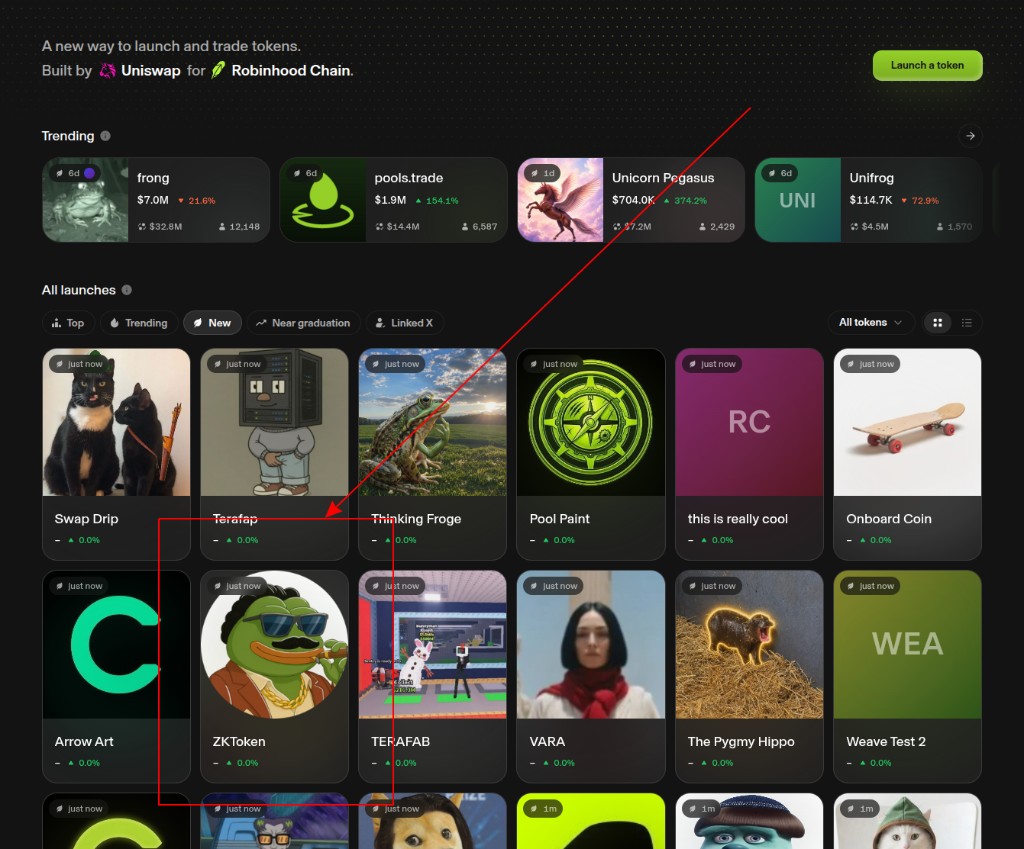
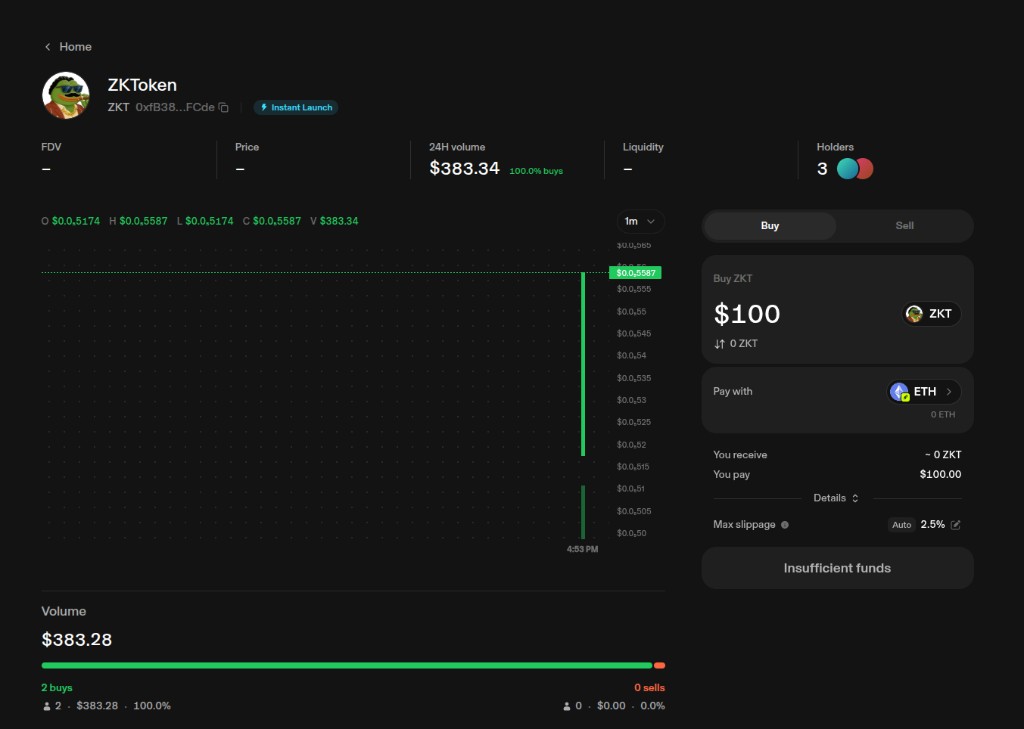
This Instant Launch was done with the companion CLI (description, website, Pinata image, fees off). It shows up on pools.trade’s All launches feed and trades as a normal Instant Launch market:
- Token page: pools.trade/t/…FCde
- Contract:
0xfB38…FCdeon Blockscout
Bottom line: LiquidityLauncher, the official SDK, and Uniswap v4 are the durable integration surface. pools.trade is one convenient client on top of that stack.